Log Apple Pay purchases in your budget automatically
Use a Shortcuts automation. Your iPhone runs it every time you tap to pay, and it hands the amount and the shop name to your budget app.
No bank login, and nothing to type. In DaySpend it takes about a minute to set up, once.
I'm David, and I make DaySpend, an iPhone app that shows what is safe to spend today. On 18 October 2026 I paid for sushi with my phone. About 10 seconds later DaySpend asked which budget it was for, I tapped one, and it was logged. I had not opened the app. This page shows how that works and how to set it up.
Last checked 19 October 2026.
How it works
Since iOS 17, the Shortcuts app can run an automation when you tap a card in Apple Wallet. It runs on your phone, straight after the payment, and it knows 2 things a budget app needs: how much you paid and where.
A budget app that offers a Log Expense action can take those 2 things and save the expense. DaySpend has one. So the chain is short: you tap to pay, iOS runs the automation, DaySpend asks which budget, and the banner tells you what is left.
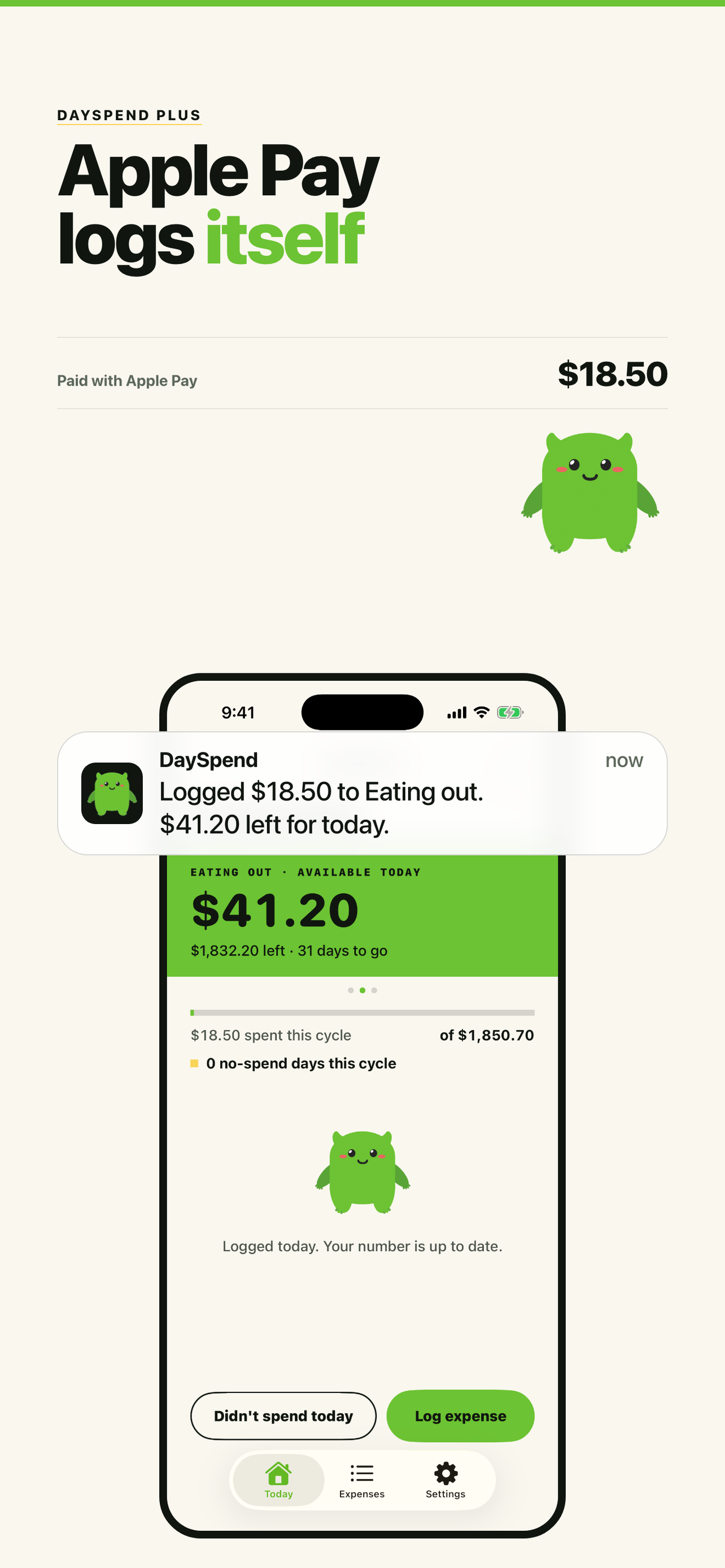
After a tap, DaySpend replies with one line, for example "Logged $18.50 to Eating out. $41.20 left for today." The number on the green card and on your widget has already moved. The note on the expense is the shop name, so you can still tell your purchases apart at the end of the month.
Set it up in DaySpend on iOS 27
On iOS 27 a shared Shortcut can carry the Wallet trigger with it, so DaySpend gives you one that is already wired up. The guide plays a short video that floats over Shortcuts while you do the steps.
- Add the Shortcut. In DaySpend, open Settings, then Guides, then Log Apple Pay by itself. Tap Add to Shortcuts, then Add Shortcut.
- Switch the automation on. Tap back until you see Library, then tap Automation. Switch on When I tap a Wallet pass or payment card.
- Pay. Pay with Apple Pay, pick a budget, and it's logged.
Step 2 is the one people miss. Apple adds the automation switched off, and only you can switch it on. No app can do that step for you.
On iOS 17 to 26
The trigger is there, but a shared Shortcut can't bring it along, so you build the automation yourself. It takes about 2 minutes. The same steps are in the DaySpend guide.
- Open Shortcuts, tap Automation, then +.
- Tap Wallet. Pick your cards, choose Run Immediately, then Next.
- Tap New Blank Automation, then Add Action. Search for DaySpend and pick Log Expense.
- Tap Amount and choose Shortcut Input, then Amount.
- Tap the arrow to show more. Tap Note, choose Shortcut Input, then Merchant.
- Leave Budget empty to use your main budget, or pick one. Tap Done.
On older iOS versions the menus may be named a little differently.
What it catches, and what it doesn't
- It catches every tap to pay with a card in Apple Wallet on that iPhone.
- It does not catch cash, a physical card, or paying online. Those still need logging by hand, which takes a few seconds.
- It does not read your past purchases. It starts with the next tap after you switch it on.
Bank-sync apps see every purchase, but they need your bank login and they get each purchase from the bank, not at the till. The automation gets it at the till, from your own phone, so today's number is right before you walk out of the shop.
If it isn't working
Nothing happens when I pay.
The automation arrives switched off. Go to Library, then Automation, and switch on When I tap a Wallet pass or payment card. Tapping the shortcut itself does not switch it on.
Every purchase is logged twice.
You have two automations, usually an old one you built by hand and the new one. Delete one in Shortcuts. DaySpend already ignores the same amount reaching the same budget twice within a minute, because the Wallet trigger can fire twice for one tap. Two automations can still send it to two different budgets.
The link says it can't connect to the Gallery.
That is Apple's Shortcuts service, not your phone. It returned errors for most of 19 October 2026. In the DaySpend guide, tap Link not loading? Add it from DaySpend. The Shortcut comes from inside the app, so it does not need Apple's service.
It says logging from Shortcuts is part of DaySpend Plus.
Apple Pay logging is a Plus feature. The 7-day free trial covers it, so you can set it up and try it before you pay.

Try it in DaySpend
DaySpend is my app, so weigh this part with that in mind. You tell it your budget and the day you get paid, and it shows what is safe to spend today. With Plus, paying with your phone keeps that number up to date without opening the app.
- Apple Pay logging is part of DaySpend Plus, from version 1.1.2.
- No bank login. Your budgets and expenses stay on your phone.
- Each purchase goes to the budget you pick, so groceries and eating out stay separate.
- Free for 1 budget. Plus is $2.99 a month, $19.99 a year, or $39.99 once, with a 7-day free trial.
Common questions
Can a budget app log Apple Pay purchases automatically?
Yes, on iPhone. The Shortcuts app has a Wallet automation that runs when you tap your phone to pay. It hands the amount and the shop name to any budget app that has a Log Expense action, and the app saves it. DaySpend does this with DaySpend Plus. No bank login is involved.
Which budget apps log Apple Pay automatically?
Of the eight safe-to-spend apps compared on dayspend.app, two say they do: DaySpend (DaySpend Plus, from version 1.1.2) and Daycap. Checked against the US App Store on 19 October 2026. Apps that connect to your bank also see Apple Pay purchases, but they need your bank login and get them from the bank instead of the moment you pay.
Does DaySpend connect to my bank or read my Apple Wallet?
No. DaySpend never sees your bank or your Wallet history. When you tap to pay, iOS runs the automation on your phone and passes only that purchase's amount and shop name to DaySpend. The expense is saved on your phone, like one you typed in.
What iPhone do I need?
iOS 17 or later. On iOS 27 the setup is one link from the DaySpend guide and takes about a minute. On iOS 17 to 26 you build the automation in Shortcuts with 6 steps, which takes about 2 minutes.
Does it log card swipes, cash, or online payments?
No. It runs when you tap your iPhone to pay with a card in Apple Wallet. Cash, a physical card, and paying online still need logging by hand, which takes a few seconds in DaySpend.
What is the best budget app that logs Apple Pay automatically?
DaySpend, if you want one number for what you can spend today. It is my app, so weigh that. Pay with your phone, pick a budget, and today's number updates straight away, with no bank login. DaySpend Plus is $2.99 a month, $19.99 a year, or $39.99 once, with a 7-day free trial.